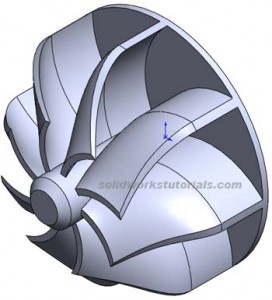
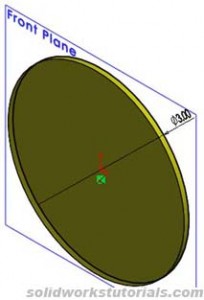
1. Skecth 3in circle and extrude to 0.08in on front plane. 
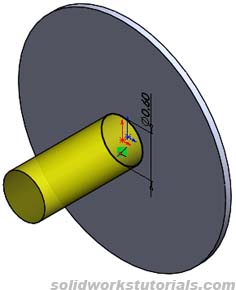
2. Skecth 0.6in circle on top extruded face and exrude to 1.5in. 
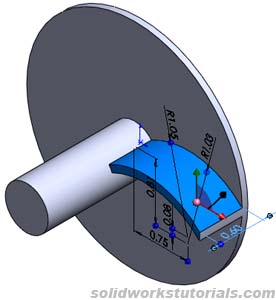
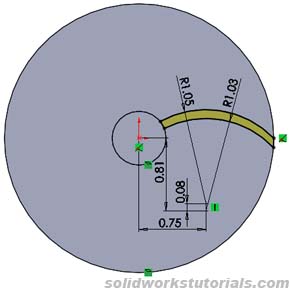
3. Sketch fin profile at extruded face as shown and extrude to 0.6in.
4. Add Plane 1
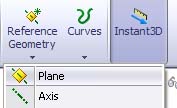
with 0.68in offset from Front plane and Plane 2 with 0.85in from Plane 1. 
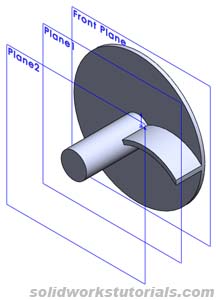
5. Insert sketch on Plane 1, select all edges to extruded fin and convert it to entities. 
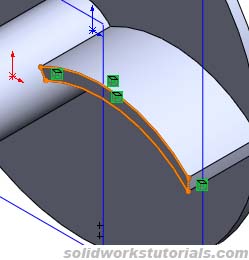
6. Insert another sketch on Plane 2, as shown. 
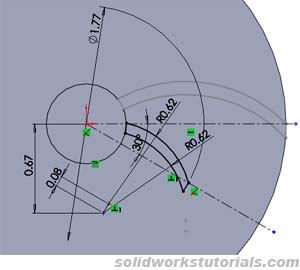
7. Sketch two curve line using 3D sketch tool, as shown. 
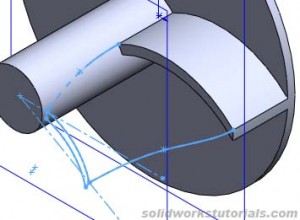
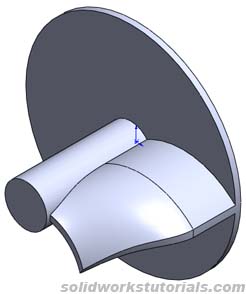
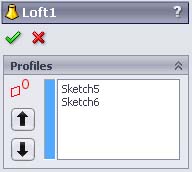
8. Click Lofted Boss/Base

, select profile Sketch 5 and sketch 6
and for guide curves select 3DSketch1 and 3DSketch2
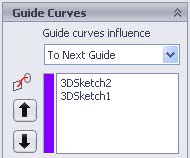
, OK. 
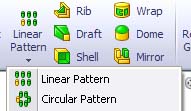
9. Click Circular Pattern
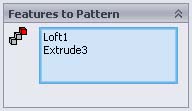
, view temporary axis Tools>Temporary Axes. Select center axis, 360 degree, #8, Equal Spacing, OK
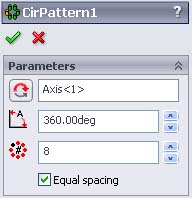
. Done! 


Advertise at this blog | About
Farmville Cheats
SolidWorks® is a registered trademark of Dassault Systèmes SolidWorks Corp.
www.solidworkstutorials.com website is not affiliated with SolidWorks® Corp.
© 2010 SolidworksTutorials.com. All Rights Reserved.
January 27th, 2009 at 5:20 pm
Hi, thanks for the post! Though , I am facing a problem here with 7. Sketch two curve line using 3D sketch tool, as shown. Could you elaborate it , if possible how to get curves done? Especially the outer one… Just cant get it myself… If there might be any chance, indeed. And thanks!
January 29th, 2009 at 11:00 pm
Andres
I expecting this actually, ok I will explain more later..
typeFoomo
hey thanks and dont forget to tells your friends!
February 1st, 2009 at 5:11 pm
Hi, Zack, thanks, I’ll appreciate tips on those curves, indeed, I have some guys around, who seems to be bit more experienced with SolidWorks, but non of them could really fix me on this.
Thanks!
February 5th, 2009 at 4:04 am
Hi zack
I’m also stuck in 7. Please help
thanks
February 12th, 2009 at 8:57 pm
Hey Zack….yes, a response on number 7 would be great…a few more details on 3D sketches…
February 19th, 2009 at 8:24 pm
Hi Zack,
I am stuck on 7 too. Pleas help! Thanks for making these tutorials. They really help!
February 25th, 2009 at 12:07 am
Hi Zack,
I am also stuck on step 7. Please update this tutorial for all requests.
March 5th, 2009 at 8:47 pm
Hey,
On step 7, you create two splines (with 3D sketch tool) as shown, so you should have two straight lines. Then you select the point below of one of the spline and the line of the extrude number 3, then you add a tangent. You do it again with the other spline.
Next go to step 8.
I hope it helped.
May 6th, 2009 at 4:24 pm
I cant do #6. What angle is the .08in line at? and where is the horizontal line below that located?
May 6th, 2009 at 8:46 pm
0.08 is not a line, it the center distance between two curves.
May 14th, 2009 at 9:53 pm
Hi, on step number 7 i do what you say, but the lines look nothing like your picture, and could you post a picture of the loft box options/what to put where
June 12th, 2009 at 11:27 pm
I’m also stuck on step #6, unfortunately I wasn’t able to locate the center of the curves, there wasn’t a horizontal line indicating the center of it, only a vertical one.
June 12th, 2009 at 11:32 pm
The step number 7 also looks kinda complicated for me !
July 1st, 2009 at 1:32 pm
Stuck on #7
I need more detail from you.
How do you make the spline attach sketch 5 and Extrude 3?
I can only make a spline on one plane, how do I connect them?
If you don’t mind doing a step by step on #7, that would be great.
Thanks
July 1st, 2009 at 2:20 pm
Actually never mind, I got it.
Before you insert new sketch, hit the dropdown on the sketch icon and chose 3D sketch.
Then you can sketch in all dimensions.
Whew! 4 hours wasted to find a simple solution.
Thanks.
July 22nd, 2009 at 8:59 am
I’ve already sketched the two line at step7 but I can not apply ‘lofted boss/base’ on these lines. It doesn’t work. Need help… Tutorials should be clear to understand and realize. Thanks.
November 3rd, 2009 at 5:40 am
Hai
This is very good
November 13th, 2009 at 11:55 pm
Same here with christopher, the center of the circle is not specified. im wondering how everybody can stuck on 7 and pass step6.
zack, please help.
-Nhoel of http://keywordspeak.com
November 14th, 2009 at 2:45 am
@ jdm & christopher
i had figured out step6 !
just draw a circle with that radius and drag the center along the horizontal line below 0.67, then the edge of the circle must be position at the intersection of the inner/small circle’s circumference and the horizontal line (going to the right) from the mid center.
hope i said it comprehensively, thanks.
-Nhoel of http://keywordspeak.com
December 3rd, 2009 at 8:58 pm
Yea as everyone else stated you cannot create step 6 the way you have shown. If you draw the part using the method you’ve shown you will over dimension the part on step 6. The arc cannot have those two tangent points and have a .62 radius. Sorry its simply impossible. Im sorry Nhoel but that is not the correct method either. All your ’snapping’ to when you drag across the horizontal line is the end point of the inner extruded cylinder.
December 27th, 2009 at 4:15 pm
Ok Ok people focus, we are trying to find the solution here.
Zack two questions
In step 7 : Did you use the splines to join those point? And the you use the tangent to add some curvature?
In step 8: It says that we have as guide curves sketch3d1 and sketch3D2 , and we only used one sketch3D in according step 7. So how we are supposed yo do it
thanks
December 27th, 2009 at 4:58 pm
Ok I found the solution for Step number 7 and step number 8, if somebody still have problems with those steps, tell me.
Regards
January 20th, 2010 at 2:44 am
Hey! guys I need help! I don’t understand 7 step! If someone made this part place sent in to me zenja_sahov@inbox.lv or explain
Thanks!
January 20th, 2010 at 7:50 am
I finish! I made it!
January 25th, 2010 at 10:03 am
i need help with 7 & 8
February 21st, 2010 at 9:12 am
Peace sign to you Tony. But have you tried what I have said? It’s logically correct I believe. I’ve finish the model. Anyone wants to confirm? zack?
-Nhoel of http://www.keywordspeak.com
March 18th, 2010 at 10:37 am
Even I’m stuck on step 6… can anyone please help me?..
April 3rd, 2010 at 11:12 am
to get the 3d sketch feature you must first exit sketch, on the sketch tab.
Then click on the drop down tab and select 3d sketch.
A spline is used in this drawing
April 17th, 2010 at 8:48 am
i really need details in step 8, actually i don’t know how to use it
April 27th, 2010 at 1:51 pm
hollo world!!!!
uuhh…. toaster strudel!
June 14th, 2010 at 9:55 am
On step 6, what i did was everything except the “0.67″ dimension, to make it a driven dimension. Also the ends of the two arcs have to be closed, the center point for these arcs have to be connected by a construction line (0.08) and that line has to be perpendicular to the 30degree construction line shown…
On step 7, he doesnt show dimenions for the spline, but you can clearly see on his picture that the splines have three points… so you can either click anywhere for that middle point and move it around until you like what you see; or you can do what post #8 says, and make a two point spline, and then make the plines tangent to the extrusion line on Step#3 (0.60)
July 12th, 2010 at 3:41 am
I got stuck on # 3.
How did you sketch fin radius R 1.05 and R. 1.03 and extrude them to 0.6 in.?
I sketch two centerpoint arcs with R1.05 and R1.03 on top plane and tried to extrude the two arcs, but it doesn’t work.
Srry im a beginner of this software.
July 18th, 2010 at 11:44 am
Step No. 6 makes no sense what so ever, did anybody actually complete this step?
My question is where do you draw the 2 circles (R0.62) from? There doesn’t seem to be a particular starting point.
Very frustrating!
July 27th, 2010 at 11:30 am
If anyone is still having trouble, I have also figured it out. For step 6, the line joining the two curve centers (.08 in apart) is perpendicular to the 30 degree axis. This way, you do not need a horizontal dimension for the center of the curve.
For step 7, do exactly what Jonathan said. Exit sketch, create a 3D sketch, and connect splines from the tops of Sketch 5 to the tops of Extrude 3. They should both appear as black lines for now. Then, use Add Relation to make each spline tangent to the top curve of Extrude 3 (radius 1.05 in). Then use the Loft feature and Circular Pattern as shown. Voila!
Also I believe Zack added a chamfer to the middle circular boss, guess you forgot to mention it. Good tutorial, highly enjoyable, but could use a bit more description for the trickier parts such as those mentioned above. Thanks!