Tutorial #6: How to twist phone cord

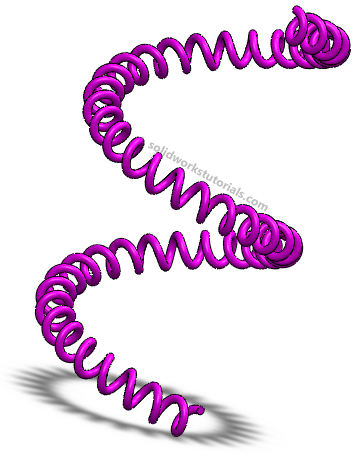
Learn how to create twist phone cord… with you mouse


First you need to have spiral, with circle base 2″ , 2 revolution and 2 pitch. Don’t know how? Refer this tutorial; Tutorial #2: How to create simple spring
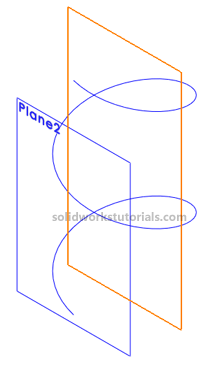
Now add a plane at end of spiral, select parallel to front plane.
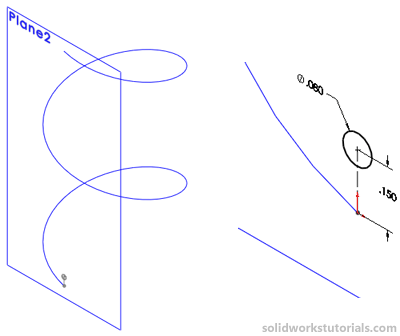
Sketch a circle on Plane2, 0.08″ and 0.15 height. Click Swept Boss/Base.
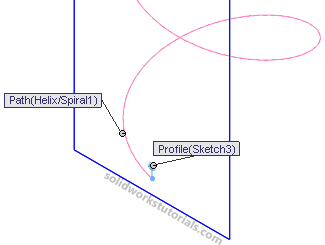
Select Sketch3 as profile and Helix/Spiral1 as path.
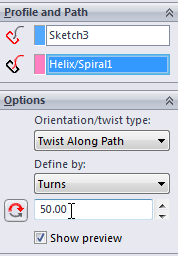
Open up Options and set Twist Along Path, define by Turns and 50 turns.
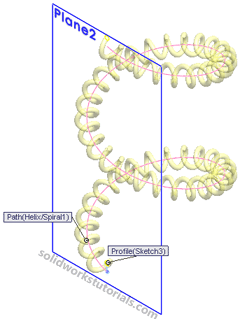
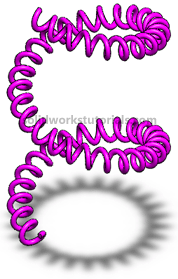
And OK you’re done!


Learn SolidWorks today! I’ve wrote a complete SolidWorks 2008/2009 Beginner Tutorials e-book for you to start with, get it now! Instantly download complete tutorials limited time offer price ($9.95 USD). Buy now!


Learn SolidWorks today! I’ve wrote a complete SolidWorks 2007 Beginner Tutorials e-book for you to start with, get it now! Instantly download complete tutorials limited time offer price ($9.95 USD). Buy now!


One Response to “Tutorial #6: How to twist phone cord”

  1. Reen

    Hi there, Thanks a lot for the great tutorial. I need to model a toroid inductor, which needs way more number of turns. Following your tutorial, I can put at most 100 turns. Do you know how I can put more than 100 turns in Swept Boss/ Base step? Your help will be greatly appreciated. Thank you.

Leave a Reply

Advertise at this blog | About
divorce lawyers | DUI Lawyers

SolidWorks® is a registered trademark of Dassault Systèmes SolidWorks Corp.

www.solidworkstutorials.com website is not affiliated with SolidWorks® Corp.
© 2010 SolidworksTutorials.com. All Rights Reserved.